Understanding the 75% Keyboard Concept
Custom mechanical keyboards have taken the gaming and typing community by storm, with enthusiasts seeking to build their ideal keyboard tailored to their unique preferences. Among various sizes, the 75% Keyboard stands out due to its compact design that strikes a balance between functionality and space-saving features. This article delves into everything you need to know about 75% keyboards—from their structure to the essential components involved in creating your own custom build.
What is a 75% Keyboard?
A 75% keyboard typically includes around 84 keys, maintaining most of the essential keys found in a full-sized keyboard while minimizing the overall footprint. It retains the function row, arrow keys, and a condensed layout that makes it more portable than a TKL (Tenkeyless) or full-sized keyboard. This layout is particularly popular among gamers and typists who value desk space and portability but still desire functionality.
Benefits of Using 75% Keyboards
- Space Efficiency: The compact design allows more desk space for other peripherals and a cleaner setup.
- Portability: Easy to transport, making them ideal for gamers who travel or work across different setups.
- Retained Functionality: Many features of larger keyboards are retained, ensuring flexibility in usage without sacrificing essential functions.
- Customization: Enthusiasts can create personalized layouts and aesthetics that reflect their style, from unique keycap designs to custom switches.
Common Features and Layouts
75% keyboards often feature a layout that can include dedicated function keys, arrow keys, and a few additional navigation keys. While not standardized, many brands have adopted layouts that prioritize versatility. This section will explore various layouts available in the market, detailing how different brands implement their designs for user satisfaction.
Choosing the Right Components
Building a custom 75% keyboard is not just about the body; it involves selecting the right components that enhance performance and match personal style. Here, we will discuss essential parts needed for a custom build, as well as factors to consider when choosing keycap materials and switch types.
Essential Parts for a Custom Build
- PCB (Printed Circuit Board): The heart of the keyboard, it connects all components and determines the layout.
- Case: Protects the internal components and provides the keyboard’s overall aesthetics.
- Key Switches: The mechanism that registers keystrokes. Options include linear, tactile, and clicky switches.
- Keycaps: The plastic covers that sit on top of the switches, available in various materials and designs.
- Stabilizers: Used for larger keys to prevent wobble and ensure a smooth typing experience.
Keycap Materials and Designs
Keycaps come in various materials, including ABS and PBT. ABS is lightweight and allows for intricate designs, while PBT is more durable and resistant to wear. When choosing keycaps, consider not just the look but also the feel and sound they produce when typing—a crucial aspect for many enthusiasts. Custom keycap sets can also be themed, allowing you to express your personality through your keyboard.
Switch Types: Linear vs. Tactile
When selecting switches, understanding the differences between linear and tactile switches is essential for a satisfactory typing experience. Linear switches provide a smooth keystroke with no tactile feedback, while tactile switches offer a noticeable bump during activation, which many find satisfying for typing. Gamers might prefer linear switches for rapid keystrokes, while typists may opt for tactile for more accurate typing.
Step-by-Step Assembly Process
Assembling your 75% keyboard can be a rewarding endeavor that enhances your appreciation for mechanical keyboards. Below is a comprehensive guide to ensure a successful build, from preparation to testing the final product.
Preparation and Setup
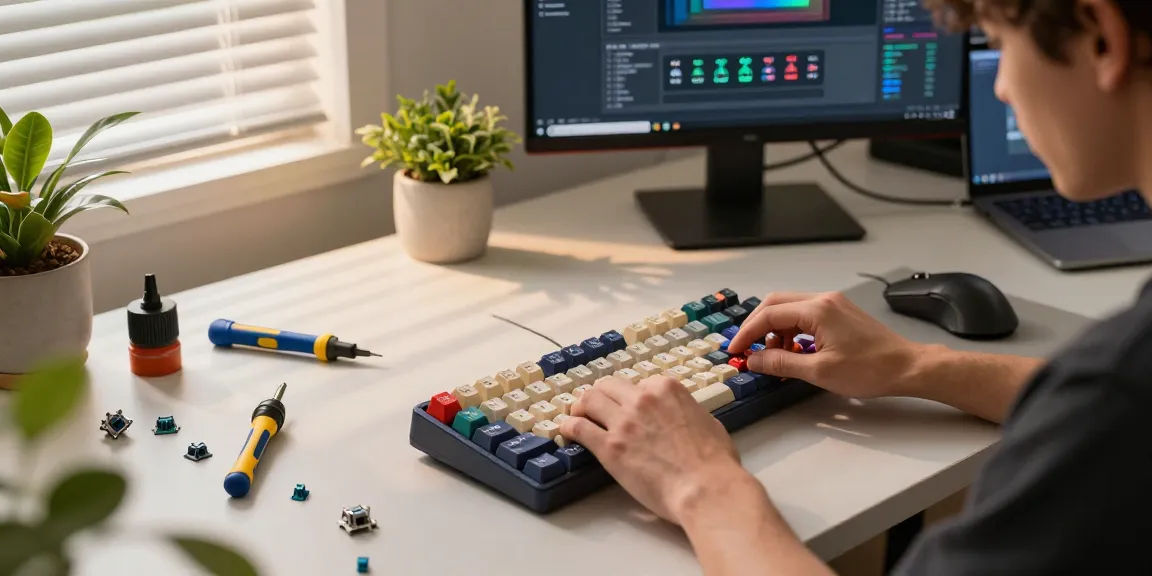
Gather all required tools and components before starting your build. Typical tools include a soldering iron (if soldering is necessary), screwdriver, and keycap puller. Setting up a clean workspace will help ensure that no parts are lost during the assembly process.
Assembling Your 75% Keyboard
The assembly process begins with placing the switches into the PCB. Depending on whether your switches are hot-swappable, you may or may not need to solder them. Once the switches are in place, attach the stabilizers for larger keys, followed by the case assembly. Finally, secure everything together and attach the keycaps, paying attention to their orientation.
Testing and Troubleshooting
Once your keyboard is assembled, it’s time to test its functionality. Use a keyboard testing software to ensure each key registers correctly. If some keys do not respond, revisit your assembly steps, checking for proper seating of switches and connections. This process may be tedious but is vital to ensure a flawless user experience.
Customizing Your Keyboard Experience
After building your keyboard, customization options are limitless. From software configurations to visual aesthetics, personalizing your 75% keyboard can greatly enhance your experience.
Software for Keyboard Configuration
Most custom keyboards allow users to remap keys and create macros through dedicated software. These programs let you adjust key functions according to your workflow or gaming needs, making efficiency an important feature of custom builds.
Creating Macros and Shortcuts
Setting up macros can significantly speed up repetitive tasks, whether you’re gaming or working. Utilize the software to assign complex commands to a single key press, which can be a game-changer in competitive situations or for productivity tasks.
Visual Personalization: LED Lighting
Many modern 75% keyboards come with RGB lighting options, allowing for further customization. You can choose static colors, create breathing effects, or even sync lighting with different programs, enhancing both functionality and aesthetics.
Future Trends in Mechanical Keyboards
As the industry continues to evolve, several trends are emerging that will shape the future of mechanical keyboards, particularly in the 75% size category. From advancements in switch technology to innovative design aesthetics for 2026, staying informed will help you keep pace with developments.
Innovations in Switch Technology
The latest advancements in switch design promise refined tactile feedback, improved durability, and even customizable resistance levels. These developments aim to enhance user comfort and performance, catering to a broader range of preferences.
Emerging Design Trends for 2026
As minimalism gains traction, we can expect to see sleeker designs that prioritize functionality without compromising aesthetics. Customization will likely extend beyond keycaps and switches to include modular components that allow users to modify their keyboards easily.
Community Insights and Predictions
Engagement within the keyboard community fosters innovation. Enthusiasts often share their experiences and suggestions online, influencing market trends. Keeping an eye on community forums can provide valuable insights into what users desire in their keyboards.
Are Custom Mechanical Keyboards Worth the Investment?
Investing in a custom mechanical keyboard like a 75% model can provide long-term benefits, enhancing both typing comfort and efficiency. While the initial cost may be higher than standard keyboards, the quality and personalization offered make it a worthwhile consideration for serious users.
What are the Most Popular 75% Keyboard Options?
Several models have garnered attention within the keyboard community for their performance and customization options. Models like the AULA AG75 and MCHOSE Ace 75 are favorites among enthusiasts for their build quality and features, providing excellent value for those looking to embark on their custom keyboard journey.
How to Maintain and Care for Your Keyboard?
Maintenance is key to ensuring the longevity of your keyboard. Regular cleaning, careful handling of components, and proper storage can prevent deterioration. Additionally, understanding how to change out key switches and keycaps will keep your keyboard fresh and functional.
Where to Find Keyboards and Components?
Numerous online retailers specialize in mechanical keyboards and custom components. Websites like 75% Keyboard offer a wide selection, providing enthusiasts with the tools necessary to build their ideal setups.